

Paying for blobspace
Posting blobs to Mainnet Beta costs TIA. Transaction fees depend on the gas limit and gas price. Use your client's fee estimation when submitting data. For testing on Mocha, obtain testnet tokens from the Mocha faucet and follow the getting-started guide to create and fund a signer.
PayForBlobs transactions
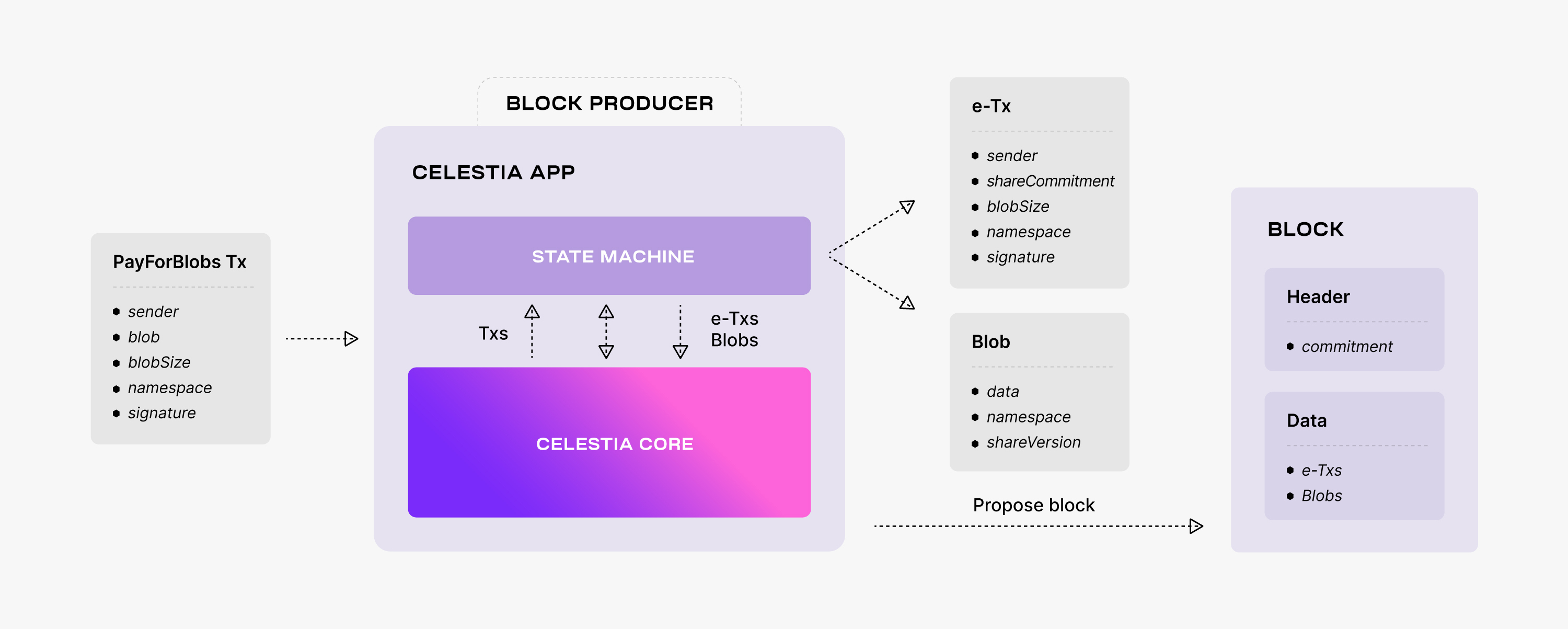
To publish data on Celestia, developers can submit PayForBlobs transactions. A
PayForBlobs transaction consists of the identity of the sender, the data to be
made available, the data size, the namespace, and a signature.
Each PayForBlobs transaction is split into two parts: the blob or blobs which
include the data to be made available along with the namespace, and the executable
payment transaction which includes a commitment to the data.
Both the blobs and executable payment transactions are put into the block within the appropriate namespace. The block data is extended using erasure coding and then Merkelized into a data root commitment included in the block header.
See the detailed life cycle of a Celestia transaction.
Learn how to submit data to Celestia’s data availability layer.
Fee market overview
Celestia uses a standard gas-price prioritised mempool. This means that transactions with higher fees will be prioritised by validators. Fees are comprised of a flat fee per transaction and then a variable fee based on the size of each blob in the transaction.
Understand how fees are calculated on Celestia in the overview on submitting PFB transactions.
Fibre fees
Fibre has a separate escrow and storage-charge model. See the Fibre pricing and escrow guidance for its calculation and requirements.
RPC and infrastructure costs
RPC access, indexing, archival data, and hosting may have separate provider fees or quotas. Network transaction fees do not pay for a provider subscription. Check the provider's pricing, authentication, and rate limits before connecting. The community services directory links to provider pricing and payment instructions.
Running your own node also has infrastructure costs. Use the node overview to choose a node type and find its hardware and operational requirements.